
What’s the most valuable visual asset of your business? Most probably, it’s the logo. It appears on your website, social media platforms, business cards, product packaging, uniforms, and marketing materials.
So, you have to be serious about the logo quality. A lot of trouble will happen if you’re working with the wrong file type.
Sometimes, you try to increase the size of your logo but it looks pixelated. That’s a clear sign that you are using the wrong logo file. Many USA-based business owners use JPG and PNG versions of their logo. When they want to print a banner, their logo quality becomes a major issue.
To avoid that, you have to know what is vector logo.
What Is a Logo Vector?
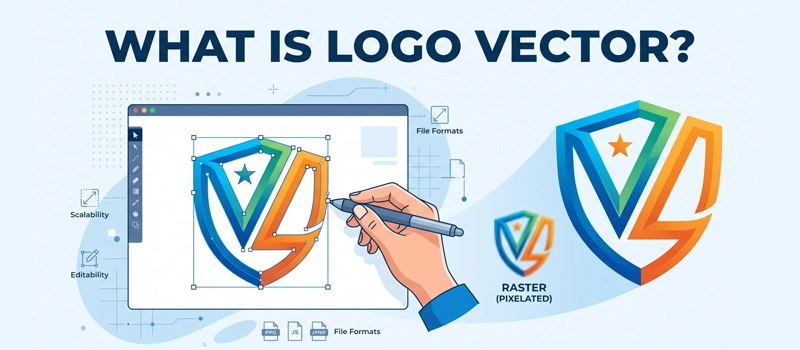
A logo vector is a logo created using path, shape, line and color. It’s not made of individual pixels like regular images.
Standard image files that are made up of tiny colored squares. Vector logos are built from curves, and shapes. These vector elements work together to create artwork.
Every professional business should have their logo in vector format. If you don’t have a vector version of your logo, you can get that through a Vector Conversion Company. After that, you can also resize your logo without losing quality.
Why Do Businesses Prefer Logo Vector?
If you zoom into a regular logo file, you’ll see blurry edges. On the other hand, a vector logo has smooth edges.
It’ll always remain consistent no matter how far you zoom. That’s why professional designers, printers, sign makers, and marketing agencies prefer vector files.
A single vector file is enough to be presented in any business visuals. You don’t need different files for printing and social media.
You can use your logo vector on social media images. Also, you can use it as a transparent watermark. Most importantly, you will get a print ready vector file.
How Does a Vector Logo Work?
To understand why Vector Logos are so valuable, you should know how a vector logo conversion works. Vector graphics use mathematical formulas to define shapes.
Let me give you an example. A circle in a vector logo isn’t created by using pixelated colored dots. It’s created using shapes.
That clearly defines where the circle begins, ends, and curves. The software recreates these shapes when your image is resized.
So, the logo vector always remains sharp. This means you can adjust a logo for a business card. You can print it on a vehicle wrap. Also, you can use it on a website.
Comparison Of Logo Vector With Raster Logo
It’s a common confusion for business owners to understand the difference between vector logo and raster graphics. As we have already mentioned, a raster logo is made from pixels.
Every JPG, PNG, GIF, and BMP file has millions of little squares of color. These pixels create the image you see on screen.
The raster logo is suitable for photographs. It becomes unsuitable when you need to resize them. As you enlarge a raster logo, the pixels become more visible. It causes the image to look blurry.
So, a logo vector is made from paths and shapes. It’s best for logos and print materials. If your goal is professional branding, a vector logo is almost always the best choice.
Why Is a Logo Vector Important for Your Business?
Many businesses don’t realize the importance of a vector logo. At some point, they face printing problems. Then, they understand the importance of a logo vector for businesses. Having a vector version of your logo can save you from those inconveniences.
Perfect for Printing
For business purposes, you have to print the logo in many large banners. Suppose, you are trying to print a logo that’s only 500 pixels wide on a 10-foot banner. It won’t look professional if you print with a raster logo.
Only a vector logo can increase any size along with maintaining sharp edges. This makes it ideal for billboards, storefront signs, Vehicle wraps, and banners.
Maintains Professional Brand Quality
Your logo represents your brand. When customers see a blurry logo, it creates a negative impression. It shows that your business lacks professionalism. A vector logo makes your brand always appear consistent.
So, you don’t have any other option to maintain professional brand quality without using a logo vector.
Easy to Update
Businesses need updates from time to time. So, you may also need to update your logo to reflect those changes. You may decide to update your colors, adjust text, add a slogan, or refresh your branding.
Vector files make these changes simple. Because each element are separately created. Everything is editable.
Multiple Marketing Materials
A single vector logo can be used on websites, social media, business cards, product packaging, uniforms, promotional products, and signage. You don’t need separate versions for every application.
So, this is a big advantage for the marketing team. Whenever you need to print something, you can do that without any delay.
Brand Assets
If you don’t need large-format printing at present, you might need it in the future. It’s a brand asset. Keeping a vector version of your logo keeps you prepared for any marketing opportunity.
AI files are supported in Adobe Illustrator. You can use those files in any vector-based editing application. They are considered the master file. Because they have full editing capabilities.
Sum Up
At this point, you should have all the clarity about what is logo vector. If you want to update your old logo, you can do it by getting our services. We can work on any logo to trace it manually.
If you have multiple images, you will get a special discount. We don’t have any minimum order limitations. You can get our service for a single image also. So. you don’t need to hire an internal designer team. Our vector team is ready to serve you 24/7 with any design requirements.
FAQ’s
How do I get my logo vector?
You can get your logo vector by sending us your old logo file. You can send us your old logo in any supported format. We will send you the final vector file.
How to check if a logo is vector?
The simple way is to check the file format. AI, EPS, SVG, and PDF are common file types for a logo vector. You can also zoom in on the logo to see the clarity. A vector file always stays clear.
Is vector better than PNG?
PNG is a raster file format. If you are going to print the image, vector is better than PNG. For digital screens, a PNG file is suitable.
Can I convert a logo to a vector?
Yes, you can use Adobe Illustrator to convert a logo to a vector. You should use the manual tracing process to keep the result professional.